Why Chisel
One undoubtable point of contention that is surely to arise is the decision for Wlink to be constructed using Chisel . A best effort will be performed to explain the motivations, trials and tribulations of this decision. Please read this not as a reason for why you should switch to using Chisel (although hopefully you can see some of the benefits) but meerly as to why we decided to use Chisel. This is written with the best intensions of being productive to everyone who comes across it. We are all friends here, if I thought you weren’t my friend, I don’t think I could bear it.
Motivations for Chisel
Chisel first started around 2012, originally being developed by UC Berkley. The goal was to design a hardware construction language (HCL) that still had the lower level features of traditional HDLs such as Verilog/SystemVerilog/VHDL, but could also leverage software paradigms not found in traditional HDLs. This HCL is built on top of Scala as a Domain-Specific-Language (DSL). Our first introduction to Chisel was early 2019. As to be expected when you have a heavy hardware background, the implementation using Chisel was…needless to say…challenging. As with any new programming language we figured out how to do “Hello World” then immediately tried to do something way outside anything we had ever done before (because we are engineers!).
We ran into several issues. Some of this was due to Chisel’s lack of documentation and StackOverflow posts (again, we are engineers, so if the answer isn’t on SO we can just never figure it out). Part of it was due to learning Scala. You see, you are actually learning two “languages” here, Chisel and Scala! We tried some minimal examples, and quickly started to come to the conclusion that we do this in Verilog just as fast, if not faster. So we quickly gave up and defaulted back to Verilog…
At this time (early 2019) we had a version of Wlink (among other IPs) that was based on Verilog. It worked, but changes were often difficult. Even with decent Verilog parameters, python/perl scripts, we still found ourselves modifying RTL for new versions. Thinking that this is just the way HW always has been and always will, we took it on the chin.
In early 2020 we had been floating the idea of doing a host SoC based on chiplets. Our problem was multi-faceted, but the main issue was sourcing a linux-capable CPU. We had noticed Chipyard and spent some spare time looking into how it works and what it generated. After researching, we started to see the power of this SoC/CPU generator (including rocket-chip among many other repos). Were we sleeping on Chisel? Many of the issues we had faced over the years (connecting components via AXI/APB/etc.) looked to be solved here! What kind of magic have we stumbled across? Shirley this can’t be seriously generating synthesizeable RTL!? But it was. This prompted a much more indepth investigation.
From here we went further down the rabbit hole. We will spare the details of our personal journey and meerly focus on findings, implementations, etc.
But I already know Verilog/VHDL!
The first thing most people do when they hear about Chisel is go straight to their search engine of choice an search for “Chisel vs Verilog”. Hopefully they see and actually read this (https://stackoverflow.com/questions/53007782/what-benefits-does-chisel-offer-over-classic-hardware-description-languages). There really isn’t a better explanation and the description of C and Python is a pretty accurate comparison.
But I already know Verilog! That’s great and it will serve you well in Chisel! Chisel doesn’t magically make you a better hardware designer. Much like you buying that fancy sports car doesn’t make you a great driver, I mean there are plenty of YouTube videos to prove it! Chisel can, and will increase your productivity as a hardware designer. Barriers that used to hold you back from a Verilog/VHDL standpoint are usually removed.
As with anything worth doing however, there will be a learning curve, but it’s in our opinion it is something worthwhile. The main thing to remember when you are exploring Chisel is that Chisel is not a Verilog generator! Chisel is a design framework and (one of) the outputs happens to be Verilog. As you start to use it more, this becomes more apparent and issues like debugging the Verilog output become easier.
Note
Ok, so Chisel doesn’t really output Verilog. It generally outputs FIRRTL which is converted to Verilog. I’m trying to keep things simple here :)
Diplomacy
Diplomacy is undoubtably the main backbone of Wlink. As stated before, the original Wlink (and S-Link ) were developed using traditional Verilog flows. While much effort was made to modularize the design, we still kept running into the same issue; every time we needed a different configuration outside of simple parameters such as address/data width, it would require us to either create a wrapper or add ports/logic we didn’t need to use on every instance. When the number of configurations are low, this issue doesn’t seem as apparent, a small inconvenience. However as configurations grow, this problem exasperates. Maintaining the wrappers becomes unstable, much time is spent manually wiring up logic which in turn results in errors.
Remember, the goal of Wlink is not so much to be a single IP that you use, like an Ethernet controller or I2C master, but to be a configurable design block that enables you to explore and implement chiplet designs. Wlink is meant to grow and modify based on your implementation, not force you to modify based on it!
So what were our options? Python/Perl scripts? Hire more people? Give up? Python scripts were originally looked at. We had experience using python for RTL generation (see gen_registers, however this is usually a concatenation exercise. We are mearly writing the Verilog through a code generator in this case and quite a bit of infrastructure goes into this for minimal flexibility. We would also be starting this from scratch.
Referring back to Chipyard and seeing the power of how all of the memory mapped protocols were connected sparked interest. How does this work? Could it be extended?
But first, a quick (and I mean quick) overview of Diplomacy. Diplomacy is a parameter negotiation framework which allows multiple components (called Nodes) to exchange parameters to decide on how hardware should be elaborated. A user would connect these Nodes and these Nodes are now capable of passing information between one another. The user is essentially drawing a directed acyclic graph. The information passed between these Nodes are user defined parameters. These parameters can be something simple, such as the width of a bus, or they can be more complex such as information about a memory mapped AXI port.
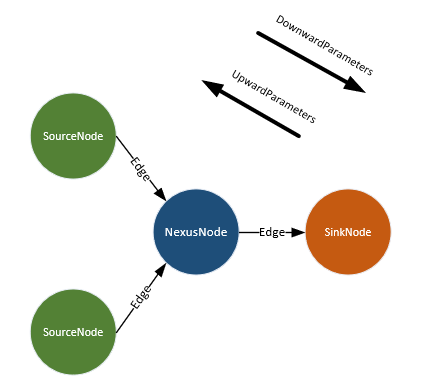
Simple Node connections
This parameter negotiation allows two nodes to communicate with each other and resolve how connections should be made. Unlike verilog where you need to pass a parameter all around, in Diplomacy you can forward between connected nodes, making decisions on how or what to generate from a hardware perspective.
As a quick example, let’s take a look at the WlinkTxRouter. Here we are converging mulitple interfaces into a single output. If using a traditional
verilog we could use a parameter and generate statements to make a router flexible. Let’s look at what we did in
S-Link :
module slink_generic_tx_router #(
  parameter NUM_CHANNELS      = 8,
  parameter TX_APP_DATA_WIDTH = 64
)(
  input  wire                           clk,
  input  wire                           reset,
  input  wire                           enable,

  input  wire [NUM_CHANNELS-1:0]        tx_sop_ch,
  input  wire [(NUM_CHANNELS*8)-1:0]    tx_data_id_ch,
  input  wire [(NUM_CHANNELS*16)-1:0]   tx_word_count_ch,
  input  wire [(NUM_CHANNELS*
                TX_APP_DATA_WIDTH)-1:0] tx_app_data_ch,
  output wire [NUM_CHANNELS-1:0]        tx_advance_ch,

  output wire                           tx_sop,
  output wire [7:0]                     tx_data_id,
  output wire [15:0]                    tx_word_count,
  output wire [TX_APP_DATA_WIDTH-1:0]   tx_app_data,
  input  wire                           tx_advance
);

//removed for clarity
And when we want to instantiate this module at a higher level
slink_generic_tx_router #(
  //parameters
  .NUM_CHANNELS       ( 3         ),
  .TX_APP_DATA_WIDTH  ( TX_APP_DATA_WIDTH )
) u_slink_generic_tx_router (
  .clk                 ( link_clk             ),
  .reset               ( link_reset           ),
  .enable              ( 1'b1                 ),  /
  .tx_sop_ch           ( {int_tx_sop,
                          apb_tx_sop,
                          axi_tx_sop}         ),
  .tx_data_id_ch       ( {int_tx_data_id,
                          apb_tx_data_id,
                          axi_tx_data_id}     ),
  .tx_word_count_ch    ( {int_tx_word_count,
                          apb_tx_word_count,
                          axi_tx_word_count}  ),
  .tx_app_data_ch      ( {int_tx_app_data,
                          apb_tx_app_data,
                          axi_tx_app_data}    ),
  .tx_advance_ch       ( {int_tx_advance,
                          apb_tx_advance,
                          axi_tx_advance}     ),
  .tx_sop              ( tx_sop               ),
  .tx_data_id          ( tx_data_id           ),
  .tx_word_count       ( tx_word_count        ),
  .tx_app_data         ( tx_app_data          ),
  .tx_advance          ( tx_advance           ));
Ok that’s not too bad. But think for a minute, what do I do if I have an implementation that now needs 4 channels instead of 3? What about 8?
I may even need mulitple versions on the same physical design meaning `define is out of the question.
Let’s look at how we solved this problem in Wlink using diplomacy. We will gloss over some of the more in-depth details and simply show the implementation. It’s ok not to understand every piece of the code right now!
For the WlinkTxRouter definition, I define a WlinkTxNexusNode which allows multiple inputs and outputs (where the inputs/outputs are
WlinkLLTxBundles. In the case of the WlinkTxRouter I have N inputs and 1 output. The number of inputs isn’t actually known
until Chisel elaboration time. So we now have two issues:
We don’t know how many channels will be available until elaboration
We don’t know the maximum width to support unti elaboration
So what we have is the WlinkTxNexusNode that can look at the parameters of all incoming nodes at elaboration time. The number
of channels is easily discoverable via the node.in variable for the WlinkTxNexusNode, but we can also go through
and look at all of the parameters to figure out what is the largest datawidth we need to support.
Based on all of this information, we can construct the HW soley based on what is connected! Amazing! Let’s look at the code.
class WlinkTxRouter()(implicit p: Parameters) extends LazyModule{
  var largestWidth = 8

  // Going through upward/downward parameters and creating an output parameter
  // that represents the largest width we see.
  val node = WlinkTxNexusNode(
    sourceFn = {
      src => src.foreach { s =>
        if(s.width > largestWidth){largestWidth = s.width}
      }
      val newSrc = WlinkLLSourceTxPortParameters(sources = Seq(WlinkLLSourceTxParameters(Seq(0x0), "TxRouter")), width = largestWidth)
      newSrc
    },
    sinkFn = { seq =>
      seq(0).copy()
    }
  )

  // This is the actual Hardware implementation!
  lazy val module = new LazyModuleImp(this) with RequireAsyncReset{
    val io = IO(new Bundle{
      val enable  = Input (Bool())
    })

    val tx_out              = node.out.head._1    //This is the WlinkLLTxBundle going out
    val (tx_ins, edgesIn)   = node.in.unzip       //These are the WlinkLLTxBundles coming in
    val numChannels         = node.in.size        //This is how many channels we have
  //rest removed for clarity
When we have additional nodes we want to connect (such as any application protocols) we can easily connect these. Let’s look at a small portion of code where things get connected to this router
txrouter.node         := axi2wl.awFC.txnode
txrouter.node         := axi2wl.wFC.txnode
txrouter.node         := axi2wl.bFC.txnode
txrouter.node         := axi2wl.arFC.txnode
txrouter.node         := axi2wl.rFC.txnode
Here we are connecting nodes for each FC block to the router. This does two things. It effectively “draws” these connections between nodes, meaning we are essentially defining how data flows through the Wlink. This is pre-elaboration, and allows Diplomacy to see how things are connected, and we can define any parameter checks if we have them. Then during elaboration, we take information about the hardware graph and build logic as needed. Here is a small snippet of the verilog output showing the 5 channels in and single channel out
WlinkTxRouter txrouter ( // @[Wlink.scala 84:27]
  .clock(txrouter_clock),
  .reset(txrouter_reset),
  .auto_in_4_sop(txrouter_auto_in_4_sop),
  .auto_in_4_data_id(txrouter_auto_in_4_data_id),
  .auto_in_4_word_count(txrouter_auto_in_4_word_count),
  .auto_in_4_data(txrouter_auto_in_4_data),
  .auto_in_4_crc(txrouter_auto_in_4_crc),
  .auto_in_4_advance(txrouter_auto_in_4_advance),
  .auto_in_3_sop(txrouter_auto_in_3_sop),
  .auto_in_3_data_id(txrouter_auto_in_3_data_id),
  .auto_in_3_word_count(txrouter_auto_in_3_word_count),
  .auto_in_3_data(txrouter_auto_in_3_data),
  .auto_in_3_crc(txrouter_auto_in_3_crc),
  .auto_in_3_advance(txrouter_auto_in_3_advance),
  .auto_in_2_sop(txrouter_auto_in_2_sop),
  .auto_in_2_data_id(txrouter_auto_in_2_data_id),
  .auto_in_2_word_count(txrouter_auto_in_2_word_count),
  .auto_in_2_data(txrouter_auto_in_2_data),
  .auto_in_2_crc(txrouter_auto_in_2_crc),
  .auto_in_2_advance(txrouter_auto_in_2_advance),
  .auto_in_1_sop(txrouter_auto_in_1_sop),
  .auto_in_1_data_id(txrouter_auto_in_1_data_id),
  .auto_in_1_word_count(txrouter_auto_in_1_word_count),
  .auto_in_1_data(txrouter_auto_in_1_data),
  .auto_in_1_crc(txrouter_auto_in_1_crc),
  .auto_in_1_advance(txrouter_auto_in_1_advance),
  .auto_in_0_sop(txrouter_auto_in_0_sop),
  .auto_in_0_data_id(txrouter_auto_in_0_data_id),
  .auto_in_0_word_count(txrouter_auto_in_0_word_count),
  .auto_in_0_data(txrouter_auto_in_0_data),
  .auto_in_0_crc(txrouter_auto_in_0_crc),
  .auto_in_0_advance(txrouter_auto_in_0_advance),
  .auto_out_sop(txrouter_auto_out_sop),
  .auto_out_data_id(txrouter_auto_out_data_id),
  .auto_out_word_count(txrouter_auto_out_word_count),
  .auto_out_data(txrouter_auto_out_data),
  .auto_out_crc(txrouter_auto_out_crc),
  .auto_out_advance(txrouter_auto_out_advance),
  .io_enable(txrouter_io_enable)
);
Essentially we are defining how components connect, drawing these connections, and having each node generate its own hardware. We free ourselve from the mundane and easily error-prone task of manually wiring things up. We can also add in various checks to validate the design prior to building the hardware which can save us valuable time when exploring various design options.
This was just a small glimpse of Diplomacy and how Wlink currently uses Diplomacy for hardware design generation.
Context Dependent Environments (CDE)
Wlink utilizes the Context Depenent Environments (CDE) which is also found in Chipyard and rocket-chip. See Wlink Configs for some details of Wlink specific configs and additional resources.
Chisel Improvements
Chisel is actively maintained and constantly improving. There are a multitude of projects being done in Chisel and traction is gaining in the industry. Appropriate requests and issues are handled by the Chisel maintainers (now mostly SiFive) in a timely manner. Or course, seeing as Chisel is open source, you are free to create your own versions and improvements (supposedly a few large companies have done just this).
One common complaint about Chisel is the verilog generation. While this is certainly a point that is hard to argue against, it must be said that the Verilog generation has gotten better over time and continues to do so. One project looking to help out this in regard is CIRCT. Once CIRCT is ready for primetime, we plan to offer this as another way to generate the Verilog.
Additional Resources
Should you decide to expand your horizons and explore Chisel in more detail, here are some helpful resources.